<?xml version="1.0" encoding="utf-8"?><feed xmlns="http://www.w3.org/2005/Atom" xml:lang="zh-CN"><generator uri="https://jekyllrb.com/" version="4.4.1">Jekyll</generator><link href="https://zenghome.cn/feed.xml" rel="self" type="application/atom+xml" /><link href="https://zenghome.cn/" rel="alternate" type="text/html" hreflang="zh-CN" /><updated>2026-04-10T01:02:19+08:00</updated><id>https://zenghome.cn/feed.xml</id><title type="html">芥末三文鱼的研发日志</title><subtitle>专注物联网技术分享</subtitle><entry><title type="html">如何使用安信可 BW20 模组对接 AWS IoT Core</title><link href="https://zenghome.cn/iot/realtek/amebadplus/2025/01/03/how-to-use-bw20-to-connect-aws-iot.html" rel="alternate" type="text/html" title="如何使用安信可 BW20 模组对接 AWS IoT Core" /><published>2025-01-03T17:56:46+08:00</published><updated>2025-01-03T17:56:46+08:00</updated><id>https://zenghome.cn/iot/realtek/amebadplus/2025/01/03/how-to-use-bw20-to-connect-aws-iot</id><content type="html" xml:base="https://zenghome.cn/iot/realtek/amebadplus/2025/01/03/how-to-use-bw20-to-connect-aws-iot.html"><![CDATA[<h1 id="1-准备工作">1. 准备工作</h1>
<p>按照 <a href="https://blog.csdn.net/u011300834/article/details/141448802">安信可 BW20-12F / BW20-07S 模组（RTL8711DAx）开发环境搭建指南</a> 配置好编译环境。</p>
<h1 id="2-安装并配置-aws-命令行工具">2. 安装并配置 AWS 命令行工具</h1>
<h2 id="21-安装-aws-cli">2.1. 安装 <code class="language-plaintext highlighter-rouge">aws-cli</code></h2>
<div class="language-shell highlighter-rouge"><div class="highlight"><pre class="highlight"><code><span class="nv">$ </span><span class="nb">sudo </span>snap <span class="nb">install </span>aws-cli <span class="nt">--classic</span>
</code></pre></div></div>
<div class="language-plaintext highlighter-rouge"><div class="highlight"><pre class="highlight"><code>aws-cli (v2/stable) 2.22.21 from Amazon Web Services (aws✓) installed
</code></pre></div></div>
<h2 id="22-创建-aws-访问凭证">2.2. 创建 AWS 访问凭证</h2>

<p>登录 AWS 控制台，打开 <a href="https://us-east-1.console.aws.amazon.com/iam/home?region=ap-southeast-1#/security_credentials/access-key-wizard">Create access key</a> 页面，点击按钮创建 Access Key，保存好刚才创建的 Access Key。</p>

<blockquote>
  <p><strong>注意⚠：这个页面只会显示一次，所以务必保存好</strong></p>
</blockquote>

<h2 id="23-配置-aws-命令行工具">2.3. 配置 AWS 命令行工具</h2>

<div class="language-shell highlighter-rouge"><div class="highlight"><pre class="highlight"><code><span class="nv">$ </span>aws configure
</code></pre></div></div>

<p>根据向导提示输入刚才创建的 AWS 访问凭证</p>

<div class="language-plaintext highlighter-rouge"><div class="highlight"><pre class="highlight"><code>AWS Access Key ID [None]: 上一步生成的 Access key
AWS Secret Access Key [None]: 上一步生成的 Secret access key
Default region name [None]: 选一个延迟低的区域，比如 ap-southeast-1（新加坡）
Default output format [None]: text
</code></pre></div></div>

<h2 id="24-检查配置和网络连通性">2.4. 检查配置和网络连通性</h2>

<div class="language-shell highlighter-rouge"><div class="highlight"><pre class="highlight"><code><span class="nv">$ </span>aws account get-contact-information
</code></pre></div></div>

<p>此处显示你的账号信息。若提示错误，需要检查设置或者配置 HTTP 代理访问</p>

<h1 id="3-创建-aws-s3-bucket-存放-ota-固件">3. 创建 AWS S3 Bucket 存放 OTA 固件</h1>

<h2 id="31-创建-aws-s3-bucket">3.1. 创建 AWS S3 Bucket</h2>
<p>运行下面的命令创建 AWS S3 Bucket，<code class="language-plaintext highlighter-rouge">ap-southeast-1</code> 替换为要创建的区域，<code class="language-plaintext highlighter-rouge">afr-ota-aithinker</code> 替换为实际要创建的名字</p>

<blockquote>
  <p><strong>注意⚠：名称必须以 <code class="language-plaintext highlighter-rouge">afr-ota</code> 开头，否则需要手动添加 OTA 角色的 Bucket 访问权限</strong></p>
</blockquote>

<div class="language-shell highlighter-rouge"><div class="highlight"><pre class="highlight"><code><span class="nv">$ </span>aws s3api create-bucket <span class="se">\</span>
    <span class="nt">--bucket</span> afr-ota-aithinker <span class="se">\</span>
    <span class="nt">--create-bucket-configuration</span> <span class="nv">LocationConstraint</span><span class="o">=</span>ap-southeast-1
</code></pre></div></div>

<p>此处返回访问 URL。若提示名称冲突，可以换个名字。</p>

<h2 id="32-打开-s3-bucket-的版本控制功能">3.2. 打开 S3 Bucket 的版本控制功能</h2>

<p>打开 S3 Bucket 的版本控制功能，<code class="language-plaintext highlighter-rouge">afr-ota-aithinker</code> 替换为实际要创建的名字</p>

<div class="language-shell highlighter-rouge"><div class="highlight"><pre class="highlight"><code><span class="nv">$ </span>aws s3api put-bucket-versioning <span class="se">\</span>
    <span class="nt">--bucket</span> afr-ota-aithinker <span class="se">\</span>
    <span class="nt">--versioning-configuration</span> <span class="nv">Status</span><span class="o">=</span>Enabled
</code></pre></div></div>

<h2 id="33-测试上传下载文件">3.3. 测试上传下载文件</h2>

<ol>
  <li>本地创建测试文件 <code class="language-plaintext highlighter-rouge">test.txt</code></li>
</ol>

<div class="language-shell highlighter-rouge"><div class="highlight"><pre class="highlight"><code><span class="nv">$ </span><span class="nb">echo</span> <span class="s2">"hello world"</span> <span class="o">&gt;</span> test.txt
</code></pre></div></div>

<ol>
  <li>将测试文件上传到 <code class="language-plaintext highlighter-rouge">afr-ota-aithinker</code>，并改名为 <code class="language-plaintext highlighter-rouge">test2.txt</code></li>
</ol>

<div class="language-shell highlighter-rouge"><div class="highlight"><pre class="highlight"><code><span class="nv">$ </span>aws s3 <span class="nb">cp </span>test.txt s3://afr-ota-aithinker/test2.txt
</code></pre></div></div>
<div class="language-plaintext highlighter-rouge"><div class="highlight"><pre class="highlight"><code>upload: ./test.txt to s3://afr-ota-aithinker/test2.txt
</code></pre></div></div>

<ol>
  <li>将改名后的测试文件下载到本地</li>
</ol>

<div class="language-shell highlighter-rouge"><div class="highlight"><pre class="highlight"><code><span class="nv">$ </span>aws s3 <span class="nb">cp </span>s3://afr-ota-aithinker/test2.txt test2.txt
</code></pre></div></div>
<div class="language-plaintext highlighter-rouge"><div class="highlight"><pre class="highlight"><code>download: s3://afr-ota-aithinker/test2.txt to ./test2.txt
</code></pre></div></div>

<ol>
  <li>输出测试文件内容</li>
</ol>

<div class="language-shell highlighter-rouge"><div class="highlight"><pre class="highlight"><code><span class="nv">$ </span><span class="nb">cat </span>test2.txt
</code></pre></div></div>
<div class="language-plaintext highlighter-rouge"><div class="highlight"><pre class="highlight"><code>hello world
</code></pre></div></div>

<ol>
  <li>从 <code class="language-plaintext highlighter-rouge">afr-ota-aithinker</code> 删除测试文件</li>
</ol>

<div class="language-shell highlighter-rouge"><div class="highlight"><pre class="highlight"><code><span class="nv">$ </span>aws s3 <span class="nb">rm </span>s3://afr-ota-aithinker/test2.txt
</code></pre></div></div>
<div class="language-plaintext highlighter-rouge"><div class="highlight"><pre class="highlight"><code>delete: s3://afr-ota-aithinker/test2.txt
</code></pre></div></div>

<ol>
  <li>删除本地测试文件</li>
</ol>

<div class="language-shell highlighter-rouge"><div class="highlight"><pre class="highlight"><code><span class="nv">$ </span><span class="nb">rm </span>test.txt test2.txt
</code></pre></div></div>

<h1 id="4-创建-ota-服务角色">4. 创建 OTA 服务角色</h1>

<h2 id="41-创建角色的-trust-entities-策略文件">4.1. 创建角色的 Trust Entities 策略文件</h2>

<p>运行下面命令创建 <code class="language-plaintext highlighter-rouge">MyOTAServiceRolePolicy.json</code>，允许角色访问 AWS IoT 服务</p>

<div class="language-shell highlighter-rouge"><div class="highlight"><pre class="highlight"><code><span class="nv">$ </span><span class="nb">cat</span> <span class="o">&lt;&lt;</span> <span class="no">EOF</span><span class="sh"> &gt; MyOTAServiceRolePolicy.json
{
    "Version": "2012-10-17",
    "Statement": [
        {
            "Sid": "",
            "Effect": "Allow",
            "Principal": {
                "Service": "iot.amazonaws.com"
            },
            "Action": "sts:AssumeRole"
        }
    ]
}
</span><span class="no">EOF
</span></code></pre></div></div>

<h2 id="42-创建-ota-服务角色">4.2. 创建 OTA 服务角色</h2>

<p>创建角色  <code class="language-plaintext highlighter-rouge">MyOTAServiceRole</code>，指定上一步创建的策略文件</p>

<div class="language-shell highlighter-rouge"><div class="highlight"><pre class="highlight"><code><span class="nv">$ </span>aws iam create-role <span class="se">\</span>
    <span class="nt">--role-name</span> MyOTAServiceRole <span class="se">\</span>
    <span class="nt">--assume-role-policy-document</span> file://<span class="sb">`</span><span class="nb">realpath </span>MyOTAServiceRolePolicy.json<span class="sb">`</span>
</code></pre></div></div>
<div class="language-plaintext highlighter-rouge"><div class="highlight"><pre class="highlight"><code>ROLE    arn:aws:iam::991983452270:role/MyOTAServiceRole 2024-12-26T01:25:20+00:00       /       AROA6N5WSIBXGVQKCUJM3   MyOTAServiceRole
ASSUMEROLEPOLICYDOCUMENT        2012-10-17
STATEMENT       sts:AssumeRole  Allow
PRINCIPAL       iot.amazonaws.com
</code></pre></div></div>

<h2 id="43-创建策略文件">4.3. 创建策略文件</h2>

<ol>
  <li>创建策略文件 <code class="language-plaintext highlighter-rouge">AccessMyOTAServiceRolePolicy.json</code></li>
</ol>

<div class="language-shell highlighter-rouge"><div class="highlight"><pre class="highlight"><code><span class="nv">$ </span><span class="nb">cat</span> <span class="o">&lt;&lt;</span> <span class="no">EOF</span><span class="sh"> &gt; AccessMyOTAServiceRolePolicy.json
{
	"Version": "2012-10-17",
	"Statement": [
		{
			"Effect": "Allow",
			"Action": [
				"iam:GetRole",
				"iam:PassRole"
			],
			"Resource": "arn:aws:iam::`aws sts get-caller-identity --query Account --output text`:role/MyOTAServiceRole"
		}
	]
}
</span><span class="no">EOF
</span></code></pre></div></div>

<ol>
  <li>创建策略文件 <code class="language-plaintext highlighter-rouge">AccessSignerPolicy.json</code></li>
</ol>

<div class="language-shell highlighter-rouge"><div class="highlight"><pre class="highlight"><code><span class="nv">$ </span><span class="nb">cat</span> <span class="o">&lt;&lt;</span> <span class="no">EOF</span><span class="sh"> &gt; AccessSignerPolicy.json
{
    "Version": "2012-10-17",
    "Statement": [
        {
            "Sid": "",
            "Effect": "Allow",
            "Action": [
                "signer:*"
            ],
            "Resource": "*"
        }
    ]
}
</span><span class="no">EOF
</span></code></pre></div></div>

<h2 id="44-添加策略到角色">4.4. 添加策略到角色</h2>

<div class="language-shell highlighter-rouge"><div class="highlight"><pre class="highlight"><code><span class="nv">$ </span>aws iam put-role-policy <span class="se">\</span>
    <span class="nt">--role-name</span> MyOTAServiceRole <span class="se">\</span>
    <span class="nt">--policy-name</span> AccessMyOTAServiceRole <span class="se">\</span>
    <span class="nt">--policy-document</span> file://<span class="sb">`</span><span class="nb">realpath </span>AccessMyOTAServiceRolePolicy.json<span class="sb">`</span>
</code></pre></div></div>
<div class="language-shell highlighter-rouge"><div class="highlight"><pre class="highlight"><code><span class="nv">$ </span>aws iam put-role-policy <span class="se">\</span>
    <span class="nt">--role-name</span> MyOTAServiceRole <span class="se">\</span>
    <span class="nt">--policy-name</span> AccessSigner <span class="se">\</span>
    <span class="nt">--policy-document</span> file://<span class="sb">`</span><span class="nb">realpath </span>AccessSignerPolicy.json<span class="sb">`</span>
</code></pre></div></div>
<div class="language-shell highlighter-rouge"><div class="highlight"><pre class="highlight"><code><span class="nv">$ </span>aws iam attach-role-policy <span class="se">\</span>
    <span class="nt">--role-name</span> MyOTAServiceRole <span class="se">\</span>
    <span class="nt">--policy-arn</span> arn:aws:iam::aws:policy/AWSIoTFullAccess
</code></pre></div></div>
<div class="language-shell highlighter-rouge"><div class="highlight"><pre class="highlight"><code><span class="nv">$ </span>aws iam attach-role-policy <span class="se">\</span>
    <span class="nt">--role-name</span> MyOTAServiceRole <span class="se">\</span>
    <span class="nt">--policy-arn</span> arn:aws:iam::aws:policy/AmazonS3FullAccess
</code></pre></div></div>

<h2 id="45-查询策略是否成功添加">4.5. 查询策略是否成功添加</h2>

<div class="language-shell highlighter-rouge"><div class="highlight"><pre class="highlight"><code><span class="nv">$ </span>aws iam list-role-policies <span class="nt">--role-name</span> MyOTAServiceRole
</code></pre></div></div>
<div class="language-plaintext highlighter-rouge"><div class="highlight"><pre class="highlight"><code>POLICYNAMES     AccessMyOTAServiceRole
POLICYNAMES     AccessSigner
</code></pre></div></div>
<div class="language-shell highlighter-rouge"><div class="highlight"><pre class="highlight"><code><span class="nv">$ </span>aws iam list-attached-role-policies <span class="nt">--role-name</span> MyOTAServiceRole
</code></pre></div></div>
<div class="language-plaintext highlighter-rouge"><div class="highlight"><pre class="highlight"><code>ATTACHEDPOLICIES        arn:aws:iam::aws:policy/AWSIoTFullAccess        AWSIoTFullAccess
ATTACHEDPOLICIES        arn:aws:iam::aws:policy/AmazonS3FullAccess      AmazonS3FullAccess
</code></pre></div></div>

<h2 id="46-删除本地策略文件">4.6. 删除本地策略文件</h2>

<div class="language-shell highlighter-rouge"><div class="highlight"><pre class="highlight"><code><span class="nv">$ </span><span class="nb">rm </span>AccessMyOTAServiceRolePolicy.json MyOTAServiceRolePolicy.json AccessSignerPolicy.json
</code></pre></div></div>

<h1 id="5-配置代码签名服务-aws-signer">5. 配置代码签名服务 AWS Signer</h1>

<h2 id="51-创建自签名证书配置文件">5.1. 创建自签名证书配置文件</h2>

<p>创建自签名证书配置文件 <code class="language-plaintext highlighter-rouge">req.cnf</code>，指定证书用途为代码签名，公司信息根据实际替换即可</p>

<div class="language-shell highlighter-rouge"><div class="highlight"><pre class="highlight"><code><span class="nv">$ </span><span class="nb">cat</span> <span class="o">&lt;&lt;</span> <span class="no">EOF</span><span class="sh"> &gt; req.cnf
[req]
distinguished_name = req_distinguished_name
req_extensions = v3_req
prompt = no

[req_distinguished_name]
C = CN
ST = Guangdong Province
L = Shenzhen
O = Shenzhen Anxinke Technology Co., Ltd.
CN = www.ai-thinker.com

[v3_req]
keyUsage = digitalSignature
extendedKeyUsage = codeSigning
subjectAltName = @alt_names

[alt_names]
DNS.1 = www.ai-thinker.com
DNS.2 = ai-thinker.com
DNS.3 = www.aithinker.com
DNS.4 = aithinker.com
</span><span class="no">EOF
</span></code></pre></div></div>

<h2 id="52-生成自签名证书私钥">5.2. 生成自签名证书私钥</h2>

<div class="language-shell highlighter-rouge"><div class="highlight"><pre class="highlight"><code><span class="nv">$ </span>openssl genpkey <span class="nt">-algorithm</span> EC <span class="se">\</span>
    <span class="nt">-pkeyopt</span> ec_paramgen_curve:P-256 <span class="se">\</span>
    <span class="nt">-pkeyopt</span> ec_param_enc:named_curve <span class="se">\</span>
    <span class="nt">-outform</span> PEM <span class="se">\</span>
    <span class="nt">-out</span> ecdsa-sha256-signer.key.pem
</code></pre></div></div>

<h2 id="53-生成自签名证书">5.3. 生成自签名证书</h2>

<div class="language-shell highlighter-rouge"><div class="highlight"><pre class="highlight"><code>openssl req <span class="nt">-new</span> <span class="nt">-x509</span> <span class="se">\</span>
    <span class="nt">-config</span> req.cnf <span class="se">\</span>
    <span class="nt">-nodes</span> <span class="se">\</span>
    <span class="nt">-days</span> 3650 <span class="se">\</span>
    <span class="nt">-key</span> ecdsa-sha256-signer.key.pem <span class="se">\</span>
    <span class="nt">-out</span> ecdsa-sha256-signer.crt.pem
</code></pre></div></div>

<h2 id="54-上传生成的证书和私钥到-aws-certificate-manager">5.4. 上传生成的证书和私钥到 AWS Certificate Manager</h2>

<div class="language-shell highlighter-rouge"><div class="highlight"><pre class="highlight"><code><span class="nv">$ </span>aws acm import-certificate <span class="se">\</span>
    <span class="nt">--certificate</span> fileb://<span class="sb">`</span><span class="nb">realpath </span>ecdsa-sha256-signer.crt.pem<span class="sb">`</span> <span class="se">\</span>
    <span class="nt">--private-key</span> fileb://<span class="sb">`</span><span class="nb">realpath </span>ecdsa-sha256-signer.key.pem<span class="sb">`</span>
</code></pre></div></div>

<div class="language-plaintext highlighter-rouge"><div class="highlight"><pre class="highlight"><code>arn:aws:acm:ap-southeast-1:991983452270:certificate/7e352118-27d3-4376-bbb2-6a12179d4ec8
</code></pre></div></div>

<p>上传成功后，命令行返回证书对应的 ARN</p>

<h2 id="55-创建-aws-signer-配置">5.5. 创建 AWS Signer 配置</h2>

<p>创建 AWS Signer 配置 <code class="language-plaintext highlighter-rouge">MyOTASigningProfile3</code>，<code class="language-plaintext highlighter-rouge">certificateArn=</code> 后的值替换为上一步生成的 ARN</p>

<div class="language-shell highlighter-rouge"><div class="highlight"><pre class="highlight"><code><span class="nv">$ </span>aws signer put-signing-profile <span class="se">\</span>
     <span class="nt">--profile-name</span> MyOTASigningProfile3 <span class="se">\</span>
     <span class="nt">--platform-id</span> AWSIoTDeviceManagement-SHA256-ECDSA <span class="se">\</span>
     <span class="nt">--signing-parameters</span> <span class="nv">certname</span><span class="o">=</span><span class="s2">"aithinker.com"</span>,certificatePathOnDevice<span class="o">=</span><span class="s2">"ecdsa-sha256-signer.crt.pem"</span> <span class="se">\</span>
     <span class="nt">--signing-material</span> <span class="nv">certificateArn</span><span class="o">=</span>arn:aws:acm:ap-southeast-1:991983452270:certificate/7e352118-27d3-4376-bbb2-6a12179d4ec8
</code></pre></div></div>
<div class="language-plaintext highlighter-rouge"><div class="highlight"><pre class="highlight"><code>arn:aws:signer:ap-southeast-1:991983452270:/signing-profiles/MyOTASigningProfile3       Hjr4mjO9JM      arn:aws:signer:ap-southeast-1:991983452270:/signing-profiles/MyOTASigningProfile3/Hjr4mjO9JM
</code></pre></div></div>

<h1 id="6-使用-aws-signer-对固件进行签名">6. 使用 AWS Signer 对固件进行签名</h1>
<h2 id="61-上传待签名固件">6.1. 上传待签名固件</h2>

<ol>
  <li>上传 <code class="language-plaintext highlighter-rouge">ota_all.bin</code> 文件，该文件为待签名的 OTA 固件</li>
</ol>

<div class="language-shell highlighter-rouge"><div class="highlight"><pre class="highlight"><code><span class="nv">$ </span>aws s3 <span class="nb">cp </span>ota_all.bin s3://afr-ota-aithinker/ota_all.bin
</code></pre></div></div>
<div class="language-plaintext highlighter-rouge"><div class="highlight"><pre class="highlight"><code>upload: ./ota_all.bin to s3://afr-ota-aithinker/ota_all.bin
</code></pre></div></div>

<ol>
  <li>查询 <code class="language-plaintext highlighter-rouge">ota_all.bin</code> 对应 AWS S3 Bucket 中的版本 ID</li>
</ol>

<div class="language-shell highlighter-rouge"><div class="highlight"><pre class="highlight"><code><span class="nv">$ </span>aws s3api list-object-versions <span class="nt">--bucket</span> afr-ota-aithinker <span class="nt">--prefix</span> ota_all.bin <span class="nt">--query</span> Versions[0].VersionId
</code></pre></div></div>
<div class="language-plaintext highlighter-rouge"><div class="highlight"><pre class="highlight"><code>CF5s4DSv1jgGaU0S5F5pa4NV5jyiZP3x
</code></pre></div></div>

<h2 id="62-创建-ota-签名任务">6.2. 创建 OTA 签名任务</h2>

<p>创建 OTA 签名任务，对固件进行签名，<code class="language-plaintext highlighter-rouge">version=</code> 后的值替换为上一步的版本 ID</p>

<div class="language-shell highlighter-rouge"><div class="highlight"><pre class="highlight"><code><span class="nv">$ </span>aws signer start-signing-job <span class="se">\</span>
    <span class="nt">--source</span> <span class="s1">'s3={bucketName=afr-ota-aithinker,key=ota_all.bin,version=CF5s4DSv1jgGaU0S5F5pa4NV5jyiZP3x}'</span> <span class="se">\</span>
    <span class="nt">--destination</span> <span class="s1">'s3={bucketName=afr-ota-aithinker,prefix=signed-}'</span> <span class="se">\</span>
    <span class="nt">--profile-name</span> MyOTASigningProfile3
</code></pre></div></div>
<div class="language-plaintext highlighter-rouge"><div class="highlight"><pre class="highlight"><code>8141658f-f0ed-4b0d-b144-e5d8b442e088    991983452270
</code></pre></div></div>

<h2 id="63-获取生成的-ota-签名">6.3. 获取生成的 OTA 签名</h2>

<ol>
  <li>使用上一步返回的任务 ID 查询 OTA 签名任务状态</li>
</ol>

<div class="language-shell highlighter-rouge"><div class="highlight"><pre class="highlight"><code><span class="nv">$ </span>aws signer describe-signing-job <span class="se">\</span>
    <span class="nt">--job-id</span> 8141658f-f0ed-4b0d-b144-e5d8b442e088 <span class="se">\</span>
    <span class="nt">--output</span> json
</code></pre></div></div>
<div class="language-json highlighter-rouge"><div class="highlight"><pre class="highlight"><code><span class="p">{</span><span class="w">
    </span><span class="nl">"jobId"</span><span class="p">:</span><span class="w"> </span><span class="s2">"8141658f-f0ed-4b0d-b144-e5d8b442e088"</span><span class="p">,</span><span class="w">
    </span><span class="nl">"source"</span><span class="p">:</span><span class="w"> </span><span class="p">{</span><span class="w">
        </span><span class="nl">"s3"</span><span class="p">:</span><span class="w"> </span><span class="p">{</span><span class="w">
            </span><span class="nl">"bucketName"</span><span class="p">:</span><span class="w"> </span><span class="s2">"afr-ota-aithinker"</span><span class="p">,</span><span class="w">
            </span><span class="nl">"key"</span><span class="p">:</span><span class="w"> </span><span class="s2">"ota_all.bin"</span><span class="p">,</span><span class="w">
            </span><span class="nl">"version"</span><span class="p">:</span><span class="w"> </span><span class="s2">"CF5s4DSv1jgGaU0S5F5pa4NV5jyiZP3x"</span><span class="w">
        </span><span class="p">}</span><span class="w">
    </span><span class="p">},</span><span class="w">
    </span><span class="nl">"signingMaterial"</span><span class="p">:</span><span class="w"> </span><span class="p">{</span><span class="w">
        </span><span class="nl">"certificateArn"</span><span class="p">:</span><span class="w"> </span><span class="s2">"arn:aws:acm:ap-southeast-1:991983452270:certificate/7e352118-27d3-4376-bbb2-6a12179d4ec8"</span><span class="w">
    </span><span class="p">},</span><span class="w">
    </span><span class="nl">"platformId"</span><span class="p">:</span><span class="w"> </span><span class="s2">"AWSIoTDeviceManagement-SHA256-ECDSA"</span><span class="p">,</span><span class="w">
    </span><span class="nl">"platformDisplayName"</span><span class="p">:</span><span class="w"> </span><span class="s2">"AWS IoT Device Management SHA256-ECDSA "</span><span class="p">,</span><span class="w">
    </span><span class="nl">"profileName"</span><span class="p">:</span><span class="w"> </span><span class="s2">"MyOTASigningProfile3"</span><span class="p">,</span><span class="w">
    </span><span class="nl">"profileVersion"</span><span class="p">:</span><span class="w"> </span><span class="s2">"Hjr4mjO9JM"</span><span class="p">,</span><span class="w">
    </span><span class="nl">"signingParameters"</span><span class="p">:</span><span class="w"> </span><span class="p">{</span><span class="w">
        </span><span class="nl">"certificatePathOnDevice"</span><span class="p">:</span><span class="w"> </span><span class="s2">"ecdsa-sha256-signer.crt.pem"</span><span class="p">,</span><span class="w">
        </span><span class="nl">"certname"</span><span class="p">:</span><span class="w"> </span><span class="s2">"aithinker.com"</span><span class="w">
    </span><span class="p">},</span><span class="w">
    </span><span class="nl">"createdAt"</span><span class="p">:</span><span class="w"> </span><span class="s2">"2025-01-03T08:53:22+08:00"</span><span class="p">,</span><span class="w">
    </span><span class="nl">"completedAt"</span><span class="p">:</span><span class="w"> </span><span class="s2">"2025-01-03T08:53:22+08:00"</span><span class="p">,</span><span class="w">
    </span><span class="nl">"requestedBy"</span><span class="p">:</span><span class="w"> </span><span class="s2">"arn:aws:iam::991983452270:root"</span><span class="p">,</span><span class="w">
    </span><span class="nl">"status"</span><span class="p">:</span><span class="w"> </span><span class="s2">"Succeeded"</span><span class="p">,</span><span class="w">
    </span><span class="nl">"statusReason"</span><span class="p">:</span><span class="w"> </span><span class="s2">"Signing Succeeded"</span><span class="p">,</span><span class="w">
    </span><span class="nl">"signedObject"</span><span class="p">:</span><span class="w"> </span><span class="p">{</span><span class="w">
        </span><span class="nl">"s3"</span><span class="p">:</span><span class="w"> </span><span class="p">{</span><span class="w">
            </span><span class="nl">"bucketName"</span><span class="p">:</span><span class="w"> </span><span class="s2">"afr-ota-aithinker"</span><span class="p">,</span><span class="w">
            </span><span class="nl">"key"</span><span class="p">:</span><span class="w"> </span><span class="s2">"signed-8141658f-f0ed-4b0d-b144-e5d8b442e088"</span><span class="w">
        </span><span class="p">}</span><span class="w">
    </span><span class="p">},</span><span class="w">
    </span><span class="nl">"jobOwner"</span><span class="p">:</span><span class="w"> </span><span class="s2">"991983452270"</span><span class="p">,</span><span class="w">
    </span><span class="nl">"jobInvoker"</span><span class="p">:</span><span class="w"> </span><span class="s2">"991983452270"</span><span class="w">
</span><span class="p">}</span><span class="w">
</span></code></pre></div></div>

<p>可以看见存储签名信息的文件为 <code class="language-plaintext highlighter-rouge">signed-8141658f-f0ed-4b0d-b144-e5d8b442e088</code></p>

<ol>
  <li>下载存储签名信息的文件，查看内容</li>
</ol>

<div class="language-shell highlighter-rouge"><div class="highlight"><pre class="highlight"><code><span class="nv">$ </span>aws s3 <span class="nb">cp </span>s3://afr-ota-aithinker/signed-7b04fcbc-fd83-4801-8328-c5861821e0d2 <span class="nb">.</span>
</code></pre></div></div>
<div class="language-plaintext highlighter-rouge"><div class="highlight"><pre class="highlight"><code>download: s3://afr-ota-aithinker/signed-8141658f-f0ed-4b0d-b144-e5d8b442e088 to ./signed-8141658f-f0ed-4b0d-b144-e5d8b442e088
</code></pre></div></div>
<div class="language-shell highlighter-rouge"><div class="highlight"><pre class="highlight"><code><span class="nv">$ </span><span class="nb">cat </span>signed-7b04fcbc-fd83-4801-8328-c5861821e0d2
</code></pre></div></div>
<div class="language-json highlighter-rouge"><div class="highlight"><pre class="highlight"><code><span class="p">{</span><span class="w">
    </span><span class="nl">"rawPayloadSize"</span><span class="p">:</span><span class="w"> </span><span class="mi">1109376</span><span class="p">,</span><span class="w">
    </span><span class="nl">"signature"</span><span class="p">:</span><span class="w"> </span><span class="s2">"MEUCIQD+e5a9Hd+eDSmMDOmMl92EzObRh0JonAYOMvlh56zySAIgZRTdZb5fOhzg+YmDxv5qfliBgMZuWr4CUvcP1gX5W9Y="</span><span class="p">,</span><span class="w">
    </span><span class="nl">"signatureAlgorithm"</span><span class="p">:</span><span class="w"> </span><span class="s2">"SHA256withECDSA"</span><span class="p">,</span><span class="w">
    </span><span class="nl">"payloadLocation"</span><span class="p">:</span><span class="w"> </span><span class="p">{</span><span class="w">
        </span><span class="nl">"s3"</span><span class="p">:</span><span class="w"> </span><span class="p">{</span><span class="w">
            </span><span class="nl">"bucketName"</span><span class="p">:</span><span class="w"> </span><span class="s2">"afr-ota-aithinker"</span><span class="p">,</span><span class="w">
            </span><span class="nl">"key"</span><span class="p">:</span><span class="w"> </span><span class="s2">"ota_all.bin"</span><span class="p">,</span><span class="w">
            </span><span class="nl">"version"</span><span class="p">:</span><span class="w"> </span><span class="s2">"CF5s4DSv1jgGaU0S5F5pa4NV5jyiZP3x"</span><span class="w">
        </span><span class="p">}</span><span class="w">
    </span><span class="p">}</span><span class="w">
</span><span class="p">}</span><span class="w">
</span></code></pre></div></div>

<p>可以看见生成的 OTA 固件签名经 Base64 编码后为 <code class="language-plaintext highlighter-rouge">MEUCIQD+e5a9Hd+eDSmMDOmMl92EzObRh0JonAYOMvlh56zySAIgZRTdZb5fOhzg+YmDxv5qfliBgMZuWr4CUvcP1gX5W9Y=</code></p>

<h2 id="64-验证-aws-signer-生成的签名">6.4. 验证 AWS Signer 生成的签名</h2>

<ol>
  <li>通过 <code class="language-plaintext highlighter-rouge">openssl</code> 解析出证书公钥，保存为 <code class="language-plaintext highlighter-rouge">ecdsa-sha256-signer.pubkey.pem</code></li>
</ol>

<div class="language-shell highlighter-rouge"><div class="highlight"><pre class="highlight"><code><span class="nv">$ </span>openssl x509 <span class="se">\</span>
    <span class="nt">-in</span> ecdsa-sha256-signer.crt.pem <span class="se">\</span>
    <span class="nt">-noout</span> <span class="nt">-pubkey</span> <span class="o">&gt;</span> ecdsa-sha256-signer.pubkey.pem
</code></pre></div></div>
<div class="language-shell highlighter-rouge"><div class="highlight"><pre class="highlight"><code><span class="nv">$ </span><span class="nb">cat </span>ecdsa-sha256-signer.pubkey.pem
</code></pre></div></div>
<div class="language-plaintext highlighter-rouge"><div class="highlight"><pre class="highlight"><code>-----BEGIN PUBLIC KEY-----
MFkwEwYHKoZIzj0CAQYIKoZIzj0DAQcDQgAEWUEA30iw1a4fxyfRQvof9Jy0l4iX
daAx9+DGJu/nOxNqMqIEkUid9LXJzy5c+4SjQYPGeISRjV8PR0byBwHWFw==
-----END PUBLIC KEY-----
</code></pre></div></div>

<ol>
  <li>通过 <code class="language-plaintext highlighter-rouge">openssl</code>，使用公钥验证签名</li>
</ol>

<div class="language-shell highlighter-rouge"><div class="highlight"><pre class="highlight"><code><span class="nv">$ </span>openssl dgst <span class="nt">-sha256</span> <span class="se">\</span>
    <span class="nt">-verify</span> ecdsa-sha256-signer.pubkey.pem <span class="se">\</span>
    <span class="nt">-signature</span> ota_all.bin.dgst ota_all.bin
</code></pre></div></div>
<div class="language-plaintext highlighter-rouge"><div class="highlight"><pre class="highlight"><code>Verified OK
</code></pre></div></div>

<p>签名验证成功，代表 AWS Signer 工作正常</p>
<h1 id="7-创建-ota-测试设备">7. 创建 OTA 测试设备</h1>

<h2 id="71-创建设备类型">7.1. 创建设备类型</h2>

<p>运行下面的命令创建设备类型 <code class="language-plaintext highlighter-rouge">BW20Module</code></p>

<div class="language-shell highlighter-rouge"><div class="highlight"><pre class="highlight"><code><span class="nv">$ </span>aws iot create-thing-type <span class="nt">--thing-type-name</span> BW20Module
</code></pre></div></div>
<div class="language-plaintext highlighter-rouge"><div class="highlight"><pre class="highlight"><code>arn:aws:iot:ap-southeast-1:991983452270:thingtype/BW20Module    6f425319-b8e4-4091-91eb-7e1b88d26ab4    BW20Module
</code></pre></div></div>

<h2 id="72-创建设备组">7.2. 创建设备组</h2>

<p>运行下面的命令创建设备组 <code class="language-plaintext highlighter-rouge">BW20ModuleGroup</code></p>

<div class="language-shell highlighter-rouge"><div class="highlight"><pre class="highlight"><code><span class="nv">$ </span>aws iot create-thing-group <span class="nt">--thing-group-name</span> BW20ModuleGroup
</code></pre></div></div>
<div class="language-plaintext highlighter-rouge"><div class="highlight"><pre class="highlight"><code>arn:aws:iot:ap-southeast-1:991983452270:thinggroup/BW20ModuleGroup      23be07cd-2d85-4397-b722-cc2a50d6f297    BW20ModuleGroup
</code></pre></div></div>

<h2 id="73-配置-mqtt-topic-权限">7.3. 配置 MQTT Topic 权限</h2>

<ol>
  <li>运行下面命令创建权限策略配置文件 <code class="language-plaintext highlighter-rouge">BW20ModuleGroupPolicy.json</code></li>
</ol>

<div class="language-shell highlighter-rouge"><div class="highlight"><pre class="highlight"><code><span class="nv">$ </span><span class="nb">cat</span> <span class="o">&lt;&lt;</span> <span class="no">EOF</span><span class="sh"> &gt; BW20ModuleGroupPolicy.json
{
  "Version": "2012-10-17",
  "Statement": [
    {
      "Effect": "Allow",
      "Action": "iot:Connect",
      "Resource": "arn:aws:iot:ap-southeast-1:991983452270:client/</span><span class="se">\$</span><span class="sh">{iot:Connection.Thing.ThingName}"
    },
    {
      "Effect": "Allow",
      "Action": [
        "iot:Publish",
        "iot:Receive",
        "iot:PublishRetain"
      ],
      "Resource": "arn:aws:iot:ap-southeast-1:991983452270:topic/*"
    },
    {
      "Effect": "Allow",
      "Action": "iot:Subscribe",
      "Resource": "arn:aws:iot:ap-southeast-1:991983452270:topicfilter/*"
    }
  ]
}
</span><span class="no">EOF
</span></code></pre></div></div>

<ol>
  <li>运行下面的命令，创建策略 <code class="language-plaintext highlighter-rouge">BW20ModuleGroupPolicy</code></li>
</ol>

<div class="language-shell highlighter-rouge"><div class="highlight"><pre class="highlight"><code><span class="nv">$ </span>aws iot create-policy <span class="se">\</span>
    <span class="nt">--policy-name</span> BW20ModuleGroupPolicy <span class="se">\</span>
    <span class="nt">--policy-document</span> file://<span class="sb">`</span><span class="nb">realpath </span>BW20ModuleGroupPolicy.json<span class="sb">`</span>
</code></pre></div></div>
<div class="language-plaintext highlighter-rouge"><div class="highlight"><pre class="highlight"><code>arn:aws:iot:ap-southeast-1:991983452270:policy/BW20ModuleGroupPolicy    {
  "Version": "2012-10-17",
  "Statement": [
    {
      "Effect": "Allow",
      "Action": "iot:Connect",
      "Resource": "arn:aws:iot:ap-southeast-1:991983452270:client/${iot:Connection.Thing.ThingName}"
    },
    {
      "Effect": "Allow",
      "Action": [
        "iot:Publish",
        "iot:Receive",
        "iot:PublishRetain"
      ],
      "Resource": "arn:aws:iot:ap-southeast-1:991983452270:topic/*"
    },
    {
      "Effect": "Allow",
      "Action": "iot:Subscribe",
      "Resource": "arn:aws:iot:ap-southeast-1:991983452270:topicfilter/*"
    }
  ]
}
        BW20ModuleGroupPolicy   1
</code></pre></div></div>

<ol>
  <li>将权限附加到设备组 <code class="language-plaintext highlighter-rouge">BW20ModuleGroup</code></li>
</ol>

<div class="language-shell highlighter-rouge"><div class="highlight"><pre class="highlight"><code><span class="nv">$ </span>aws iot attach-policy <span class="se">\</span>
    <span class="nt">--policy</span> BW20ModuleGroupPolicy <span class="se">\</span>
    <span class="nt">--target</span> arn:aws:iot:ap-southeast-1:991983452270:thinggroup/BW20ModuleGroup
</code></pre></div></div>

<h2 id="74-创建-ota-测试设备">7.4. 创建 OTA 测试设备</h2>

<p>按照惯例，我们使用模组的 Wi-Fi MAC 地址 <code class="language-plaintext highlighter-rouge">94c96058af41</code> 作为设备名称，运行下面的命令创建 OTA 测试设备</p>

<div class="language-shell highlighter-rouge"><div class="highlight"><pre class="highlight"><code><span class="nv">$ </span>aws iot create-thing <span class="nt">--thing-name</span> 94c96058af41 <span class="nt">--thing-type-name</span> BW20Module
</code></pre></div></div>
<div class="language-plaintext highlighter-rouge"><div class="highlight"><pre class="highlight"><code>arn:aws:iot:ap-southeast-1:991983452270:thing/94c96058af41      980940fd-8c18-4e36-b104-7f039bd20a79    94c96058af41
</code></pre></div></div>

<h2 id="75-将-ota-测试设备加入设备组">7.5. 将 OTA 测试设备加入设备组</h2>

<p>运行下面命令将 <code class="language-plaintext highlighter-rouge">94c96058af41</code> 加入 <code class="language-plaintext highlighter-rouge">BW20ModuleGroup</code></p>

<div class="language-shell highlighter-rouge"><div class="highlight"><pre class="highlight"><code><span class="nv">$ </span>aws iot add-thing-to-thing-group <span class="se">\</span>
    <span class="nt">--thing-group-name</span> BW20ModuleGroup <span class="se">\</span>
    <span class="nt">--thing-name</span> 94c96058af41
</code></pre></div></div>

<h2 id="76-生成设备的证书">7.6. 生成设备的证书</h2>

<p>运行下列命令生成证书文件，证书文件只会显示一次，所以务必保存好</p>

<div class="language-shell highlighter-rouge"><div class="highlight"><pre class="highlight"><code><span class="nv">$ </span>aws iot create-keys-and-certificate <span class="se">\</span>
    <span class="nt">--set-as-active</span> <span class="se">\</span>
    <span class="nt">--certificate-pem-outfile</span> 94c96058af41.crt.pem <span class="se">\</span>
    <span class="nt">--public-key-outfile</span> 94c96058af41.pub.pem <span class="se">\</span>
    <span class="nt">--private-key-outfile</span> 94c96058af41.key.pem
</code></pre></div></div>
<div class="language-plaintext highlighter-rouge"><div class="highlight"><pre class="highlight"><code>arn:aws:iot:ap-southeast-1:991983452270:cert/f67c5a8edfb3705c5feacb1f1b052dd5f6ee23881a60ac101af9fdec08b34fe8   f67c5a8edfb3705c5feacb1f1b052dd5f6ee23881a60ac101af9fdec08b34fe8
        -----BEGIN CERTIFICATE-----
xxxxxxxxxxxxxxxxx
xxxxxxxxxxxxxxxxx
-----END CERTIFICATE-----

KEYPAIR -----BEGIN RSA PRIVATE KEY-----
xxxxxxxxxxxxxxxxx
xxxxxxxxxxxxxxxxx
-----END RSA PRIVATE KEY-----
        -----BEGIN PUBLIC KEY-----
xxxxxxxxxxxxxxxxx
xxxxxxxxxxxxxxxxx
-----END PUBLIC KEY-----
</code></pre></div></div>

<p>该证书的 ARN 为 <code class="language-plaintext highlighter-rouge">arn:aws:iot:ap-southeast-1:991983452270:cert/f67c5a8edfb3705c5feacb1f1b052dd5f6ee23881a60ac101af9fdec08b34fe8</code></p>

<h2 id="77-绑定证书到设备">7.7. 绑定证书到设备</h2>

<p>运行下面命令绑定证书到设备</p>

<div class="language-shell highlighter-rouge"><div class="highlight"><pre class="highlight"><code><span class="nv">$ </span>aws iot attach-thing-principal <span class="se">\</span>
    <span class="nt">--thing-name</span> 94c96058af41 <span class="se">\</span>
    <span class="nt">--principal</span> arn:aws:iot:ap-southeast-1:991983452270:cert/f67c5a8edfb3705c5feacb1f1b052dd5f6ee23881a60ac101af9fdec08b34fe8 <span class="se">\</span>
    <span class="nt">--thing-principal-type</span> <span class="s2">"EXCLUSIVE_THING"</span>
</code></pre></div></div>

<p>查询是否绑定成功</p>

<div class="language-shell highlighter-rouge"><div class="highlight"><pre class="highlight"><code><span class="nv">$ </span>aws iot list-thing-principals-v2 <span class="se">\</span>
    <span class="nt">--thing-name</span> 94c96058af41 <span class="se">\</span>
    <span class="nt">--output</span> json
</code></pre></div></div>
<div class="language-json highlighter-rouge"><div class="highlight"><pre class="highlight"><code><span class="p">{</span><span class="w">
    </span><span class="nl">"thingPrincipalObjects"</span><span class="p">:</span><span class="w"> </span><span class="p">[</span><span class="w">
        </span><span class="p">{</span><span class="w">
            </span><span class="nl">"principal"</span><span class="p">:</span><span class="w"> </span><span class="s2">"arn:aws:iot:ap-southeast-1:991983452270:cert/f67c5a8edfb3705c5feacb1f1b052dd5f6ee23881a60ac101af9fdec08b34fe8"</span><span class="p">,</span><span class="w">
            </span><span class="nl">"thingPrincipalType"</span><span class="p">:</span><span class="w"> </span><span class="s2">"EXCLUSIVE_THING"</span><span class="w">
        </span><span class="p">}</span><span class="w">
    </span><span class="p">]</span><span class="w">
</span><span class="p">}</span><span class="w">
</span></code></pre></div></div>

<p>可以看见证书绑定成功</p>

<h1 id="8-连接-aws-iot-core">8. 连接 AWS IoT Core</h1>
<h2 id="81-写入设备证书">8.1 写入设备证书</h2>

<p>根据设备证书生成 <code class="language-plaintext highlighter-rouge">aws_clientcredential_keys.h</code> 文件</p>

<div class="language-shell highlighter-rouge"><div class="highlight"><pre class="highlight"><code><span class="nv">$ </span><span class="nb">cat</span> <span class="o">&lt;&lt;</span> <span class="no">EOF</span><span class="sh"> &gt; ~/ameba-rtos/component/application/amazon/amazon-freertos/demos/include/aws_clientcredential_keys.h
#ifndef AWS_CLIENT_CREDENTIAL_KEYS_H
#define AWS_CLIENT_CREDENTIAL_KEYS_H

#define keyCLIENT_CERTIFICATE_PEM </span><span class="se">\\</span><span class="sh">
</span><span class="si">$(</span><span class="nb">awk</span> <span class="s1">'{ print "    \"" $0 "\\n\" \\" }'</span> 94c96058af41.crt.pem<span class="si">)</span><span class="sh">
    ""

#define keyJITR_DEVICE_CERTIFICATE_AUTHORITY_PEM NULL

#define keyCLIENT_PRIVATE_KEY_PEM </span><span class="se">\\</span><span class="sh">
</span><span class="si">$(</span><span class="nb">awk</span> <span class="s1">'{ print "    \"" $0 "\\n\" \\" }'</span> 94c96058af41.key.pem<span class="si">)</span><span class="sh">
    ""

#endif /* AWS_CLIENT_CREDENTIAL_KEYS_H */
</span><span class="no">EOF
</span></code></pre></div></div>

<h2 id="82-写入-mqtt-配置">8.2. 写入 MQTT 配置</h2>

<p>根据 Wi-Fi 配置和 AWS IoT Core 配置生成 <code class="language-plaintext highlighter-rouge">aws_clientcredential.h</code> 文件</p>

<div class="language-shell highlighter-rouge"><div class="highlight"><pre class="highlight"><code><span class="nb">cat</span> <span class="o">&lt;&lt;</span> <span class="no">EOF</span><span class="sh"> &gt; ~/ameba-rtos/component/application/amazon/amazon-freertos/demos/include/aws_clientcredential.h
#ifndef __AWS_CLIENTCREDENTIAL__H__
#define __AWS_CLIENTCREDENTIAL__H__

#define clientcredentialMQTT_BROKER_ENDPOINT         "</span><span class="si">$(</span>aws iot describe-endpoint<span class="si">)</span><span class="sh">"
#define clientcredentialIOT_THING_NAME               "94c96058af41"
#define clientcredentialMQTT_BROKER_PORT             8883
#define clientcredentialGREENGRASS_DISCOVERY_PORT    8443
#define clientcredentialWIFI_SSID                    "AIOT@FAE"
#define clientcredentialWIFI_PASSWORD                "fae12345678"
#define clientcredentialWIFI_SECURITY                eWiFiSecurityWPA3

#endif /* ifndef __AWS_CLIENTCREDENTIAL__H__ */
</span><span class="no">EOF
</span></code></pre></div></div>

<h2 id="83-编译固件">8.3. 编译固件</h2>

<div class="language-shell highlighter-rouge"><div class="highlight"><pre class="highlight"><code><span class="nv">$ </span><span class="nb">cd</span> ~/ameba-rtos/amebadplus_gcc_project
<span class="nv">$ </span>./build.py <span class="nt">-a</span> amazon_freertos
</code></pre></div></div>
<div class="language-plaintext highlighter-rouge"><div class="highlight"><pre class="highlight"><code>current host platform is linux
Default toolchain path: /opt/rtk-toolchain
ToolChain Had Existed
Toolchain Version Matched
Git found: /usr/bin/git
Python3 found: /usr/bin/python3
project : amebadplus
project : km4
ccache found
DAILY_BUILD = 0
EXAMPLE: amazon_freertos
THE PATH of example_amazon_freertos.c is /home/zxf/ameba-rtos//component/example/amazon_freertos/
project : km0
ccache found
DAILY_BUILD = 0
-- Configuring done (0.1s)
-- Generating done (0.0s)
-- Build files have been written to: /home/zxf/ameba-rtos/amebadplus_gcc_project/build
[9/14] Generating /home/zxf/ameba-rtos/amebadplus_gcc_proj...gcc_project/project_km0/asdk/image/target_img2_otrcore.asm
  BIN      km4_image2_all.bin
========== Image Info HEX ==========
/home/zxf/ameba-rtos/amebadplus_gcc_project/project_km4/asdk/image/target_img2.axf  :
section                               size         addr
.ram_image2.entry                     0x20   0x20004da0
.xip_image2.text                   0x996a0    0xe000020
.sram_timer_idle_task_stack.bss     0x1000   0x20006000
.sram_image2.text.data               0xcc0   0x2000b020
.ARM.exidx                             0x8    0xe0996c0
.ram_image2.bss                     0x8d84   0x2000bd00
.ram_image2.nocache.data              0x1c   0x20014a84
.debug_info                       0x17b62c          0x0
.debug_abbrev                      0x311d2          0x0
.debug_loc                        0x118ee1          0x0
.debug_aranges                      0x6e30          0x0
.debug_ranges                      0x1b340          0x0
.debug_line                        0xd18a3          0x0
.debug_str                         0x2d6a9          0x0
.comment                              0x37          0x0
.ARM.attributes                       0x3c          0x0
.debug_frame                       0x17174          0x0
Total                             0x4a1aaa


   text    data     bss     dec     hex filename
0x996a8   0xce0  0x9da0  672040   a4128 /home/zxf/ameba-rtos/amebadplus_gcc_project/project_km4/asdk/image/target_img2.axf
0x996a8   0xce0  0x9da0  672040   a4128 (TOTALS)
========== Image Info HEX ==========
========== Image Info DEC ==========
/home/zxf/ameba-rtos/amebadplus_gcc_project/project_km4/asdk/image/target_img2.axf  :
section                              size        addr
.ram_image2.entry                      32   536890784
.xip_image2.text                   628384   234881056
.sram_timer_idle_task_stack.bss      4096   536895488
.sram_image2.text.data               3264   536916000
.ARM.exidx                              8   235509440
.ram_image2.bss                     36228   536919296
.ram_image2.nocache.data               28   536955524
.debug_info                       1553964           0
.debug_abbrev                      201170           0
.debug_loc                        1150689           0
.debug_aranges                      28208           0
.debug_ranges                      111424           0
.debug_line                        858275           0
.debug_str                         186025           0
.comment                               55           0
.ARM.attributes                        60           0
.debug_frame                        94580           0
Total                             4856490


   text    data     bss     dec     hex filename
 628392    3296   40352  672040   a4128 /home/zxf/ameba-rtos/amebadplus_gcc_project/project_km4/asdk/image/target_img2.axf
 628392    3296   40352  672040   a4128 (TOTALS)
========== Image Info DEC ==========
========== Image manipulating start ==========
image_size= 963616
checksum=05ff08a4
image_size= 963616
checksum=05ff08a4
========== Image manipulating end ==========
[10/14] Generating /home/zxf/ameba-rtos/component/wifi/wifi_make/wifi_feature_disable/wifi_intf_drv_to_app_ext_noused.c
Gen file: /home/zxf/ameba-rtos/component/wifi/wifi_make/wifi_feature_disable/wifi_intf_drv_to_app_ext_noused.c!
[14/14] Generating /home/zxf/ameba-rtos/amebadplus_gcc_project/project_km0/asdk/image/target_img2.axf
/opt/rtk-toolchain/asdk-10.3.1/linux/newlib/bin/arm-none-eabi-nm: /home/zxf/ameba-rtos/amebadplus_gcc_project/project_km0/asdk/image/target_pure_img2.axf: no symbols
  BIN      km0_image2_all.bin
========== Image Info HEX ==========
/home/zxf/ameba-rtos/amebadplus_gcc_project/project_km0/asdk/image/target_img2.axf  :
section                              size         addr
.ram_image2.entry                    0x40   0x20004d20
.xip_image2.text                  0x4d880    0xc000020
.sram_rtos_static_0.bss             0xa10   0x20008000
.sram_rtos_static_1.bss             0x7e0   0x20005600
.sram_timer_idle_task_stack.bss    0x1000   0x20002000
.sram_image2.text.data              0xae0   0x20068020
.ARM.exidx                            0x8    0xc04d8a0
.ram_image2.bss                    0x3758   0x20068b00
.ram_image2.bd.data                   0x8   0x2006c258
.ram_image2.nocache.data            0x3a0   0x2006c260
.coex_trace.text                   0x1536   0xca000000
.debug_info                       0x2863c          0x0
.debug_abbrev                      0x8a33          0x0
.debug_loc                        0x1acb1          0x0
.debug_aranges                     0x1650          0x0
.debug_ranges                      0x3398          0x0
.debug_line                       0x1b2b6          0x0
.debug_str                         0xae66          0x0
.comment                             0x37          0x0
.ARM.attributes                      0x30          0x0
.debug_frame                       0x34c8          0x0
.stabstr                            0x14f          0x0
Total                             0xcf470


   text    data     bss     dec     hex filename
0x4f89e    0x40  0x5cf0  349646   555ce /home/zxf/ameba-rtos/amebadplus_gcc_project/project_km0/asdk/image/target_img2.axf
0x4f89e    0x40  0x5cf0  349646   555ce (TOTALS)
========== Image Info HEX ==========
========== Image Info DEC ==========
/home/zxf/ameba-rtos/amebadplus_gcc_project/project_km0/asdk/image/target_img2.axf  :
section                             size         addr
.ram_image2.entry                     64    536890656
.xip_image2.text                  317568    201326624
.sram_rtos_static_0.bss             2576    536903680
.sram_rtos_static_1.bss             2016    536892928
.sram_timer_idle_task_stack.bss     4096    536879104
.sram_image2.text.data              2784    537296928
.ARM.exidx                             8    201644192
.ram_image2.bss                    14168    537299712
.ram_image2.bd.data                    8    537313880
.ram_image2.nocache.data             928    537313888
.coex_trace.text                    5430   3388997632
.debug_info                       165436            0
.debug_abbrev                      35379            0
.debug_loc                        109745            0
.debug_aranges                      5712            0
.debug_ranges                      13208            0
.debug_line                       111286            0
.debug_str                         44646            0
.comment                              55            0
.ARM.attributes                       48            0
.debug_frame                       13512            0
.stabstr                             335            0
Total                             849008


   text    data     bss     dec     hex filename
 325790      64   23792  349646   555ce /home/zxf/ameba-rtos/amebadplus_gcc_project/project_km0/asdk/image/target_img2.axf
 325790      64   23792  349646   555ce (TOTALS)
========== Image Info DEC ==========
========== Image manipulating start ==========
image_size= 963616
checksum=05ff08a4
image_size= 963616
checksum=05ff08a4
========== Image manipulating end ==========
Build done
</code></pre></div></div>

<h2 id="84-运行-aws-iot-core-测试固件">8.4. 运行 AWS IoT Core 测试固件</h2>

<blockquote>
  <p><strong>需要使用带 4MB PSRAM 的 BW20 模组进行测试</strong></p>
</blockquote>

<p>烧录运行固件，波特率设成 1.5Mbps，发送下面的命令连接 Wi-Fi。其中 <code class="language-plaintext highlighter-rouge">TEST</code> 和 <code class="language-plaintext highlighter-rouge">12345678</code> 替换为实际的热点名称和密码</p>

<div class="language-plaintext highlighter-rouge"><div class="highlight"><pre class="highlight"><code>AT+WLCONN=ssid,TEST,pw,12345678
</code></pre></div></div>
<div class="language-plaintext highlighter-rouge"><div class="highlight"><pre class="highlight"><code>AT+WLCONN=ssid,TEST,pw,12345678
[WLAN-A] IPS out
[WLAN-A] set ssid TEST
259 523260 [example_amazon_freertos] [INFO] Waiting for the network link up event...
260 525261 [example_amazon_freertos] [INFO] Waiting for the network link up event...
261 527262 [example_amazon_freertos] [INFO] Waiting for the network link up event...
[WLAN-A] start auth to d6:d8:53:54:f0:a6
[WLAN-A] auth success, start assoc
[WLAN-A] assoc success(1)
[WLAN-A] set group key 4 2
[WLAN-I] set cam: gtk alg 4 0

 write_fast_connect_data_to_flash():not the same ssid/passphrase/channel, write new profile to flash 
[+WLCONN] Connected after 5228 ms.
[WLAN-A] set pairwise key 4(WEP40-1 WEP104-5 TKIP-2 AES-4)

Interface 0 IP address : 192.168.137.15
[+WLCONN] Got IP after 6348 ms.

+WLCONN:OK

[MEM] After do cmd, available heap 290560


#
262 529263 [example_amazon_freertos] [INFO] Creating a TLS connection to a1wpsaryt4080n-ats.iot.ap-southeast-1.amazonaws.com:8883.
263 533069 [example_amazon_freertos] [DEBUG] PKCS #11 module was successfully initialized.
264 533070 [example_amazon_freertos] [INFO] PKCS #11 successfully initialized.
265 533070 [example_amazon_freertos] [DEBUG] Successfully Returned a PKCS #11 slot with ID 1 with a count of 1.
266 533071 [example_amazon_freertos] [DEBUG] Assigned a 0x2 Type Session.
267 533071 [example_amazon_freertos] [DEBUG] Assigned Mechanisms to no operation in progress.
268 533072 [example_amazon_freertos] [DEBUG] Current session count at 0
269 533073 [example_amazon_freertos] [DEBUG] C_Login is not implemented.
270 533073 [example_amazon_freertos] [DEBUG] Successfully generated 32 random bytes.
271 533074 [example_amazon_freertos] [DEBUG] Successfully generated 16 random bytes.
272 533708 [example_amazon_freertos] [INFO] Creating an MQTT connection to a1wpsaryt4080n-ats.iot.ap-southeast-1.amazonaws.com.
273 533709 [example_amazon_freertos] [DEBUG] Encoded size for length 80 is 1 bytes.
274 533709 [example_amazon_freertos] [DEBUG] CONNECT packet remaining length=80 and packet size=82.
275 533710 [example_amazon_freertos] [DEBUG] CONNECT packet size is 82 and remaining length is 80.
276 533711 [example_amazon_freertos] [DEBUG] sendMessageVector: Bytes Sent=12, Bytes Remaining=70
277 533712 [example_amazon_freertos] [DEBUG] sendMessageVector: Bytes Sent=2, Bytes Remaining=68
278 533713 [example_amazon_freertos] [DEBUG] sendMessageVector: Bytes Sent=12, Bytes Remaining=56
279 533713 [example_amazon_freertos] [DEBUG] sendMessageVector: Bytes Sent=2, Bytes Remaining=54
280 533714 [example_amazon_freertos] [DEBUG] sendMessageVector: Bytes Sent=54, Bytes Remaining=0
281 533891 [example_amazon_freertos] [DEBUG] Encoded size for length 2 is 1 bytes.
282 533892 [example_amazon_freertos] [DEBUG] BytesReceived=2, BytesRemaining=0, TotalBytesReceived=2.
283 533892 [example_amazon_freertos] [DEBUG] Packet received. ReceivedBytes=2.
284 533893 [example_amazon_freertos] [DEBUG] CONNACK session present bit not set.
285 533893 [example_amazon_freertos] [DEBUG] Connection accepted.
286 533894 [example_amazon_freertos] [DEBUG] Received MQTT CONNACK successfully from broker.
287 533894 [example_amazon_freertos] [INFO] MQTT connection established with the broker.
288 533895 [example_amazon_freertos] [INFO] An MQTT connection is established with a1wpsaryt4080n-ats.iot.ap-southeast-1.amazonaws.com.
289 533896 [example_amazon_freertos] [INFO] Attempt to subscribe to the MQTT topic 94c96058af41/example/topic.
290 533897 [example_amazon_freertos] [DEBUG] Encoded size for length 31 is 1 bytes.
291 533897 [example_amazon_freertos] [DEBUG] Subscription packet remaining length=31 and packet size=33.
292 533898 [example_amazon_freertos] [DEBUG] SUBSCRIBE packet size is 33 and remaining length is 31.
293 533899 [example_amazon_freertos] [DEBUG] sendMessageVector: Bytes Sent=4, Bytes Remaining=29
294 533900 [example_amazon_freertos] [DEBUG] sendMessageVector: Bytes Sent=2, Bytes Remaining=27
295 533901 [example_amazon_freertos] [DEBUG] sendMessageVector: Bytes Sent=26, Bytes Remaining=1
296 533902 [example_amazon_freertos] [DEBUG] sendMessageVector: Bytes Sent=1, Bytes Remaining=0
297 533902 [example_amazon_freertos] [INFO] SUBSCRIBE sent for topic 94c96058af41/example/topic to broker.
298 534075 [example_amazon_freertos] [DEBUG] Encoded size for length 3 is 1 bytes.
299 534076 [example_amazon_freertos] [DEBUG] Received packet of type 90.
300 534076 [example_amazon_freertos] [DEBUG] Packet identifier 1.
301 534077 [example_amazon_freertos] [DEBUG] Topic filter 0 accepted, max QoS 1.
302 534077 [example_amazon_freertos] [INFO] Subscribed to the topic 94c96058af41/example/topic with maximum QoS 1.
303 534078 [example_amazon_freertos] [INFO] Publish to the MQTT topic 94c96058af41/example/topic.
304 534079 [example_amazon_freertos] [DEBUG] Encoded size for length 42 is 1 bytes.
305 534079 [example_amazon_freertos] [DEBUG] Encoded size for length 42 is 1 bytes.
306 534080 [example_amazon_freertos] [DEBUG] PUBLISH packet remaining length=42 and packet size=44.
307 534081 [example_amazon_freertos] [DEBUG] Encoded size for length 42 is 1 bytes.
308 534081 [example_amazon_freertos] [DEBUG] Adding QoS as QoS1 in PUBLISH flags.
309 534082 [example_amazon_freertos] [DEBUG] sendMessageVector: Bytes Sent=4, Bytes Remaining=40
310 534083 [example_amazon_freertos] [DEBUG] sendMessageVector: Bytes Sent=26, Bytes Remaining=14
311 534084 [example_amazon_freertos] [DEBUG] sendMessageVector: Bytes Sent=2, Bytes Remaining=12
312 534084 [example_amazon_freertos] [DEBUG] sendMessageVector: Bytes Sent=12, Bytes Remaining=0
313 534085 [example_amazon_freertos] [INFO] Attempt to receive publish message from broker.
314 534242 [example_amazon_freertos] [DEBUG] Encoded size for length 2 is 1 bytes.
315 534243 [example_amazon_freertos] [DEBUG] Received packet of type 40.
316 534243 [example_amazon_freertos] [DEBUG] Packet identifier 2.
317 534244 [example_amazon_freertos] [INFO] Ack packet deserialized with result: MQTTSuccess.
318 534245 [example_amazon_freertos] [INFO] State record updated. New state=MQTTPublishDone.
319 534245 [example_amazon_freertos] [INFO] PUBACK received for packet Id 2.
320 534270 [example_amazon_freertos] [DEBUG] Encoded size for length 42 is 1 bytes.
321 534271 [example_amazon_freertos] [DEBUG] QoS is 1.
322 534271 [example_amazon_freertos] [DEBUG] Retain bit is 0.
323 534271 [example_amazon_freertos] [DEBUG] DUP bit is 0.
324 534272 [example_amazon_freertos] [DEBUG] Topic name length: 26.
325 534272 [example_amazon_freertos] [DEBUG] Packet identifier 1.
326 534273 [example_amazon_freertos] [DEBUG] Payload length 12.
327 534273 [example_amazon_freertos] [INFO] De-serialized incoming PUBLISH packet: DeserializerResult=MQTTSuccess.
328 534274 [example_amazon_freertos] [INFO] State record updated. New state=MQTTPubAckSend.
329 534274 [example_amazon_freertos] [INFO] Incoming QoS : 1

330 534275 [example_amazon_freertos] [INFO] Incoming Publish Topic Name: 94c96058af41/example/topic matches subscribed topic.Incoming Publish Message : Hello World!
331 534277 [example_amazon_freertos] [DEBUG] sendBuffer: Bytes Sent=4, Bytes Remaining=0
332 534277 [example_amazon_freertos] [INFO] Keeping Connection Idle...
</code></pre></div></div>

<p>出现上面信息代表模组已经成功连接上 AWS IoT Core</p>

<h1 id="9-ota-测试">9. OTA 测试</h1>

<h2 id="91-创建-ota-描述文件">9.1. 创建 OTA 描述文件</h2>

<div class="language-shell highlighter-rouge"><div class="highlight"><pre class="highlight"><code><span class="nv">$ </span><span class="nb">cat</span> <span class="o">&lt;&lt;</span> <span class="no">EOF</span><span class="sh"> &gt; ota-firmware-files.json
[
    {
        "codeSigning": {
            "awsSignerJobId": "8141658f-f0ed-4b0d-b144-e5d8b442e088"
        },
        "fileName": "ota_all.bin"
    }
]
</span><span class="no">EOF
</span></code></pre></div></div>

<h2 id="92-创建-ota-任务">9.2. 创建 OTA 任务</h2>

<p>运行下面的命令创建 OTA 任务，其中 <code class="language-plaintext highlighter-rouge">bw20-ota-task-$(uuidgen)</code> 为随机生成的任务 ID，<code class="language-plaintext highlighter-rouge">arn:aws:iot:ap-southeast-1:991983452270:thinggroup/BW20ModuleGroup</code> 为步骤 7.2 中创建的设备组的 ARN，<code class="language-plaintext highlighter-rouge">arn:aws:iam::991983452270:role/MyOTAServiceRole</code> 为步骤 4.2 中创建的 OTA 服务角色。</p>

<div class="language-shell highlighter-rouge"><div class="highlight"><pre class="highlight"><code><span class="nv">$ </span>aws iot create-ota-update <span class="se">\</span>
    <span class="nt">--ota-update-id</span> bw20-ota-task-<span class="si">$(</span>uuidgen<span class="si">)</span> <span class="se">\</span>
    <span class="nt">--targets</span> arn:aws:iot:ap-southeast-1:991983452270:thinggroup/BW20ModuleGroup <span class="se">\</span>
    <span class="nt">--files</span> file://<span class="sb">`</span><span class="nb">realpath </span>ota-firmware-files.json<span class="sb">`</span> <span class="se">\</span>
    <span class="nt">--protocols</span> HTTP MQTT <span class="se">\</span>
    <span class="nt">--role-arn</span> arn:aws:iam::991983452270:role/MyOTAServiceRole
</code></pre></div></div>
<div class="language-plaintext highlighter-rouge"><div class="highlight"><pre class="highlight"><code>arn:aws:iot:ap-southeast-1:991983452270:otaupdate/bw20-ota-task-91a9f124-b43c-4c8f-aed3-e836d60d87e2    bw20-ota-task-91a9f124-b43c-4c8f-aed3-e836d60d87e2      CREATE_PENDING
</code></pre></div></div>
<h2 id="93-编译-ota-测试固件">9.3. 编译 OTA 测试固件</h2>

<p>去除 <code class="language-plaintext highlighter-rouge">~/ameba-rtos/component/application/amazon/amazon-freertos/ports/amebaDplus/aws_main.c</code> 中的<code class="language-plaintext highlighter-rouge">RunOtaCoreMqttStreamsDemo()</code> 前的注释，启用 OTA 例程，并重新编译</p>

<div class="language-c highlighter-rouge"><div class="highlight"><pre class="highlight"><code>    <span class="c1">//mqtt mutual auto demo</span>
    <span class="c1">//RunCoreMqttMutualAuthDemo(0, NULL, NULL, NULL, NULL);</span>

    <span class="c1">//http mutual auto demo</span>
    <span class="c1">//RunCoreHttpMutualAuthDemo(0, NULL, NULL, NULL, NULL);</span>

    <span class="c1">//device shadow demo</span>
    <span class="c1">//RunDeviceShadowDemo(0, NULL, NULL, NULL, NULL);</span>

    <span class="c1">//device defender demo</span>
    <span class="c1">//RunDeviceDefenderDemo(0, NULL, NULL, NULL, NULL);</span>

    <span class="c1">// ota over mqtt demo</span>
    <span class="c1">//RunOtaCoreMqttDemo(0, NULL, NULL, NULL, NULL);</span>

    <span class="c1">//ota over mqtt streams demo (NEW!)</span>
    <span class="c1">/// 去除下面这行注释</span>
    <span class="n">RunOtaCoreMqttStreamsDemo</span><span class="p">(</span><span class="mi">0</span><span class="p">,</span> <span class="nb">NULL</span><span class="p">,</span> <span class="nb">NULL</span><span class="p">,</span> <span class="nb">NULL</span><span class="p">,</span> <span class="nb">NULL</span><span class="p">);</span>
</code></pre></div></div>
<div class="language-shell highlighter-rouge"><div class="highlight"><pre class="highlight"><code><span class="nv">$ </span>./build.py <span class="nt">-a</span> amazon_freertos
</code></pre></div></div>

<p>编译完成后，烧录固件进行测试</p>

<p>（待续）</p>]]></content><author><name></name></author><category term="iot" /><category term="realtek" /><category term="amebadplus" /><summary type="html"><![CDATA[1. 准备工作 按照 安信可 BW20-12F / BW20-07S 模组（RTL8711DAx）开发环境搭建指南 配置好编译环境。 2. 安装并配置 AWS 命令行工具 2.1. 安装 aws-cli $ sudo snap install aws-cli --classic aws-cli (v2/stable) 2.22.21 from Amazon Web Services (aws✓) installed 2.2. 创建 AWS 访问凭证]]></summary></entry><entry><title type="html">安信可 BW20-12F / BW20-07S 模组（RTL8711DAx）开发环境搭建指南</title><link href="https://zenghome.cn/iot/realtek/amebadplus/2024/08/23/amebaplus-build-environment-setup-guideline.html" rel="alternate" type="text/html" title="安信可 BW20-12F / BW20-07S 模组（RTL8711DAx）开发环境搭建指南" /><published>2024-08-23T15:51:36+08:00</published><updated>2024-08-23T15:51:36+08:00</updated><id>https://zenghome.cn/iot/realtek/amebadplus/2024/08/23/amebaplus-build-environment-setup-guideline</id><content type="html" xml:base="https://zenghome.cn/iot/realtek/amebadplus/2024/08/23/amebaplus-build-environment-setup-guideline.html"><![CDATA[<h1 id="一概述">一、概述</h1>

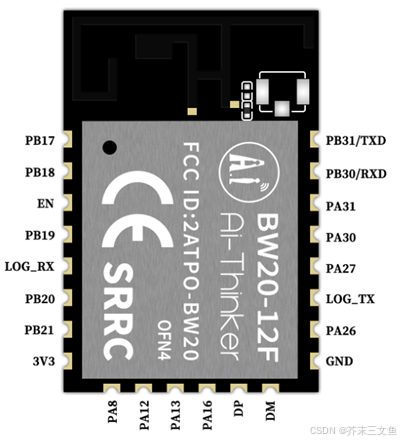
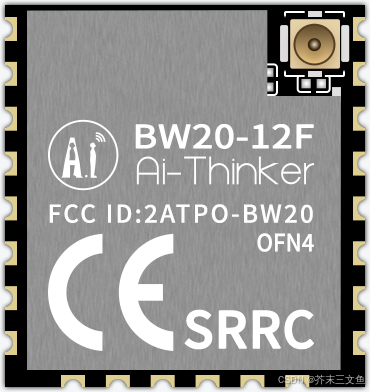
<p>BW20-12F 和 BW20-07S 是安信可基于 RTL8711DAx 芯片开发的双频 Wi-Fi 4 + BLE 5.0 SoC 模组，支持双频 802.11a/b/g/n WLAN 协议和 BLE 5.0 协议。BW20-12F 集成了双核 MCU，一个兼容 Cortex-M55 的高性能 MCU，最高主频可达 330MHz；一个兼容Cortex-M23 的低功耗 MCU。</p>

<p>BW20 系列模组具有丰富的外设接口，包括 UART / GPIO / ADC / PWM / I2S / I2C / SPI / SDIO / IR / SWD / USB 等。可广泛应用于物联网（IoT）、移动设备、可穿戴电子设备、智能家居等领域。</p>

<p>本文讲述如何基于 BW20 系列模组进行软件开发，包含环境搭建、编译、烧录和调试等内容。</p>

<p><img src="/assets/images/bw20-12f-top-view.png" alt="BW20-12F 正面图片" />
<img src="/assets/images/bw20-07s-top-view.png" alt="BW20-07S 正面图片" /></p>

<h1 id="二编译环境搭建">二、编译环境搭建</h1>

<p>瑞昱 RTL8711DAN 的 SDK 基于 FreeRTOS，开发和编译需要在 Linux 下进行，烧录软件需要在 Windows 下运行。</p>

<p>下面以 Ubuntu 24.04 LTS 为例，讲解如何搭建瑞昱 RTL8711DAN 的开发环境。</p>

<h2 id="1-安装依赖">1. 安装依赖</h2>

<div class="language-shell highlighter-rouge"><div class="highlight"><pre class="highlight"><code><span class="nb">sudo </span>apt <span class="nb">install</span> <span class="nt">-y</span> build-essential libncurses-dev libc6-i386 git-core virtualenv
</code></pre></div></div>

<h2 id="2-配置-git">2. 配置 Git</h2>

<div class="language-shell highlighter-rouge"><div class="highlight"><pre class="highlight"><code>git config <span class="nt">--global</span> user.name 你的用户名
git config <span class="nt">--global</span> user.email 你的电子邮件地址
</code></pre></div></div>

<h2 id="3-配置-git-使用-http-代理服务器">3. 配置 Git 使用 HTTP 代理服务器</h2>

<div class="language-shell highlighter-rouge"><div class="highlight"><pre class="highlight"><code>git config <span class="nt">--global</span> http.proxy http://127.0.0.1:7890
git config <span class="nt">--global</span> https.proxy http://127.0.0.1:7890
</code></pre></div></div>

<p>瑞昱 RTL8711DAN 的 SDK 在 GitHub 上，国内访问 GitHub 受阻，因此需要配置 HTTP 代理服务器。将上面命令的 <code class="language-plaintext highlighter-rouge">127.0.0.1</code> 替换成实际代理服务器地址，<code class="language-plaintext highlighter-rouge">7890</code> 替换为实际代理服务器端口号。</p>

<h2 id="4-配置-pip-使用-http-代理服务器">4. 配置 pip 使用 HTTP 代理服务器</h2>

<p>在 <code class="language-plaintext highlighter-rouge">$HOME/.profile</code> 末尾新增下面的命令，或者每次打开 shell 时执行：</p>

<div class="language-shell highlighter-rouge"><div class="highlight"><pre class="highlight"><code><span class="nb">export </span><span class="nv">HTTP_PROXY</span><span class="o">=</span><span class="s2">"http://127.0.0.1:7890"</span>
<span class="nb">export </span><span class="nv">HTTPS_PROXY</span><span class="o">=</span><span class="nv">$HTTP_PROXY</span>
<span class="nb">export </span><span class="nv">http_proxy</span><span class="o">=</span><span class="nv">$HTTP_PROXY</span>
<span class="nb">export </span><span class="nv">https_proxy</span><span class="o">=</span><span class="nv">$HTTPS_PROXY</span>
</code></pre></div></div>

<p>同样的，将上面命令的 <code class="language-plaintext highlighter-rouge">127.0.0.1</code> 替换成实际代理服务器地址，<code class="language-plaintext highlighter-rouge">7890</code> 替换为实际代理服务器端口号。</p>

<h2 id="5-克隆-sdk-到本地">5. 克隆 SDK 到本地</h2>

<p>运行下面的命令，使用 <code class="language-plaintext highlighter-rouge">git</code> 命令克隆 <code class="language-plaintext highlighter-rouge">ameba-rtos</code> 仓库到本地：</p>

<div class="language-shell highlighter-rouge"><div class="highlight"><pre class="highlight"><code><span class="nb">cd</span> ~
git clone https://github.com/Ameba-AIoT/ameba-rtos.git <span class="nt">-b</span> release/v1.0
</code></pre></div></div>

<h2 id="6-配置-virtualenv-隔离-python-运行环境">6. 配置 virtualenv 隔离 Python 运行环境</h2>

<p>SDK 的编译脚本依赖一些 Python 包，为了避免干扰到其他 Python 程序的运行，需要创建一个隔离的 Python 运行环境。</p>

<p>运行下面的命令初始化一个 virtualenv 环境，名称 <code class="language-plaintext highlighter-rouge">venv</code>：</p>

<div class="language-shell highlighter-rouge"><div class="highlight"><pre class="highlight"><code><span class="nb">cd</span> ~
virtualenv venv
<span class="nb">source</span> ~/venv/bin/activate
</code></pre></div></div>

<p>运行完成后，可以看见 shell 变成下图所示：</p>

<p><img src="https://i-blog.csdnimg.cn/direct/b8d75db7254c432abe041c48f066d260.png" alt="在这里插入图片描述" /></p>

<p>在 virtualenv 环境中使用 <code class="language-plaintext highlighter-rouge">pip</code> 安装 SDK 需要的 Python 依赖：</p>

<div class="language-shell highlighter-rouge"><div class="highlight"><pre class="highlight"><code><span class="nb">cd</span> ~/ameba-rtos
pip3 <span class="nb">install</span> <span class="nt">-r</span> tools/image_scripts/requirements.txt
</code></pre></div></div>

<h2 id="7-编译">7. 编译</h2>

<p>每次编译前都需要加载 virtualenv 环境：</p>

<div class="language-shell highlighter-rouge"><div class="highlight"><pre class="highlight"><code><span class="nb">source</span> ~/venv/bin/activate
</code></pre></div></div>

<p>运行下面命令进入 menuconfig 配置界面：</p>

<div class="language-shell highlighter-rouge"><div class="highlight"><pre class="highlight"><code><span class="nb">cd</span> ~/ameba-rtos/amebadplus_gcc_project
make <span class="nv">CONFIG_SHELL</span><span class="o">=</span>/bin/bash menuconfig
</code></pre></div></div>

<p>运行下面命令编译固件：</p>

<div class="language-shell highlighter-rouge"><div class="highlight"><pre class="highlight"><code>make <span class="nv">CONFIG_SHELL</span><span class="o">=</span>/bin/bash
</code></pre></div></div>

<p>编译完成后会在 <code class="language-plaintext highlighter-rouge">~/ameba-rtos/amebadplus_gcc_project/</code> 目录下生成 <code class="language-plaintext highlighter-rouge">km4_boot_all.bin</code> 和 <code class="language-plaintext highlighter-rouge">km0_km4_app.bin</code> ，这两个就是最后烧录到模组中的固件。</p>]]></content><author><name></name></author><category term="iot" /><category term="realtek" /><category term="amebadplus" /><summary type="html"><![CDATA[一、概述]]></summary></entry><entry><title type="html">安信可M62-CBS模组（BL616 芯片）用作 SDIO / USB 无线网卡和 BLE 适配器</title><link href="https://zenghome.cn/iot/bouffalolab/bl616/2024/04/07/how-to-take-bl616-as-wireless-nic.html" rel="alternate" type="text/html" title="安信可M62-CBS模组（BL616 芯片）用作 SDIO / USB 无线网卡和 BLE 适配器" /><published>2024-04-07T17:00:14+08:00</published><updated>2024-04-07T17:00:14+08:00</updated><id>https://zenghome.cn/iot/bouffalolab/bl616/2024/04/07/how-to-take-bl616-as-wireless-nic</id><content type="html" xml:base="https://zenghome.cn/iot/bouffalolab/bl616/2024/04/07/how-to-take-bl616-as-wireless-nic.html"><![CDATA[<h1 id="一概述">一、概述</h1>

<p>安信可 M62-CBS 无线网卡模组采用博流 BL616 芯片方案，提供 SDIO / USB 接口，同时可以通过 UART / USB 接口作为 BLE HCI 适配器使用。本文以树莓派为例，介绍 M62-CBS 驱动移植及联网的过程。</p>

<h1 id="二软硬件要求">二、软硬件要求</h1>
<h2 id="1-目标板硬件要求">1. 目标板硬件要求</h2>
<h3 id="11-通过-usb-接口连接">1.1. 通过 USB 接口连接</h3>

<ul>
  <li>USB接口</li>
</ul>

<h3 id="12-通过-sdio-接口连接">1.2. 通过 SDIO 接口连接</h3>

<ul>
  <li>SDIO</li>
  <li>UART（若需要使用 BLE 功能）</li>
</ul>

<h2 id="2-目标板软件要求">2. 目标板软件要求</h2>

<ul>
  <li>Linux Kernel 3.10 ~ 5.15.79（需要启用 mac80211 相关配置选项）</li>
  <li>wpa_supplicant / hostapd 2.9+ （需要启用 nl80211 选项后编译）</li>
  <li>BlueZ 5 （若需要使用 BLE 功能）</li>
</ul>

<h2 id="3-开发机软件要求">3. 开发机软件要求</h2>

<ul>
  <li>目标板 Linux 内核源码</li>
  <li>目标板交叉编译工具链</li>
</ul>

<h1 id="三硬件连接">三、硬件连接</h1>

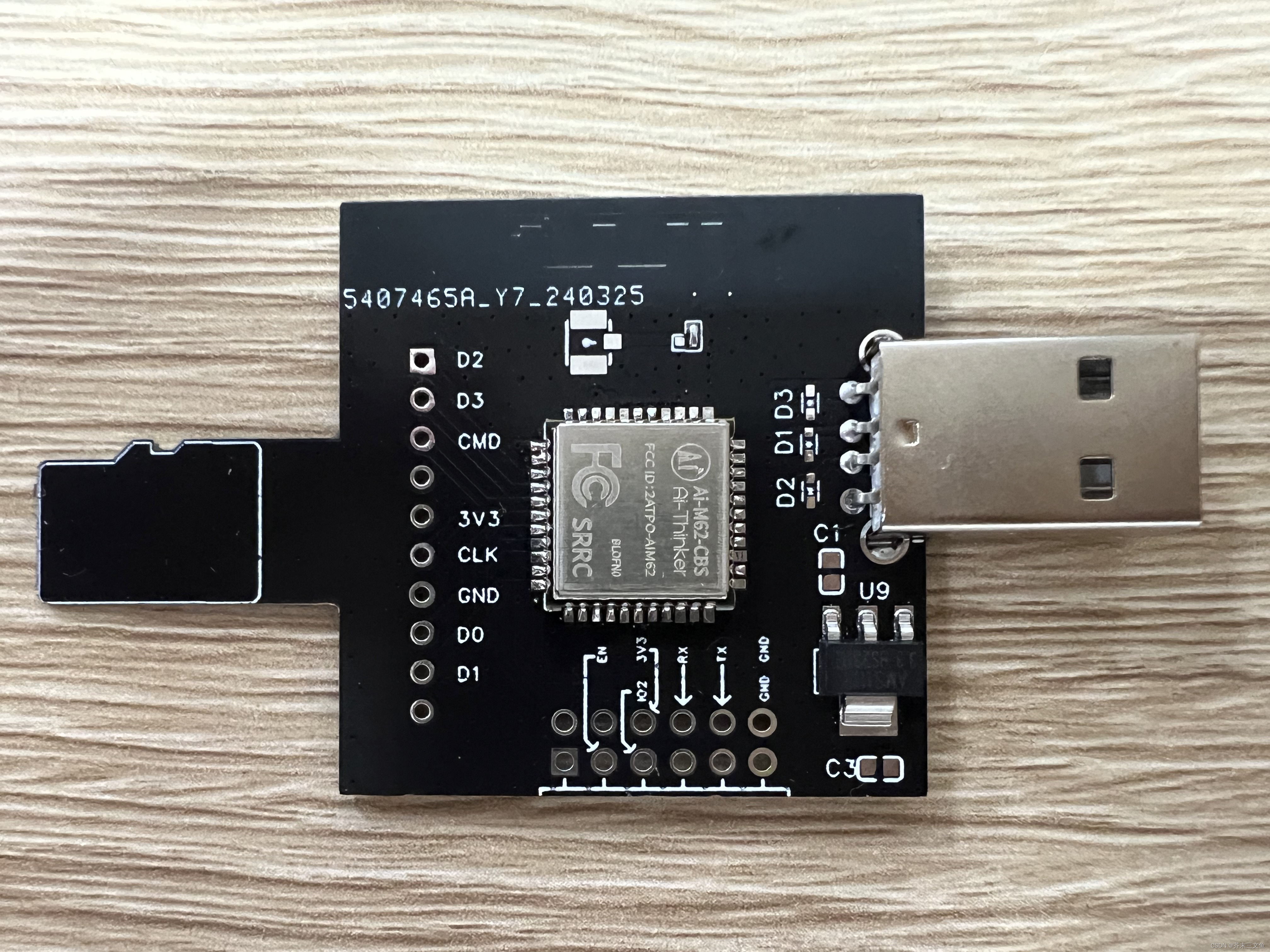
<p>您的 Linux 开发板可以通过 USB 接口或者 SDIO + UART 接口连接到 M62-CBS 模组。为了方便用户调试使用，我们已经预先设计好了下图所示的转接板，插上即可完成连接。对应嘉立创工程文件放在文章末尾的附件内了，打样时注意板厚设置为 0.8mm，不然插不进 SD 卡槽中。</p>

<p><img src="/assets/images/m62-cbs-sdio-adapter.jpeg" alt="M62-CBS TF 卡转接板" /></p>

<h1 id="四驱动编译">四、驱动编译</h1>

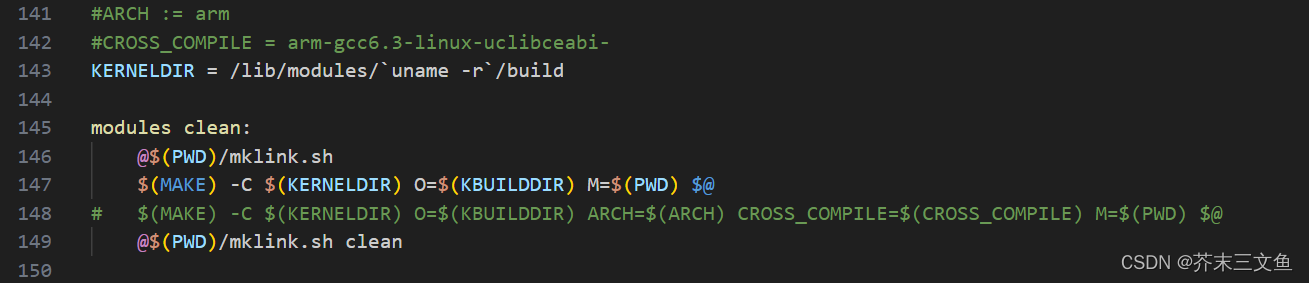
<p>驱动 Makefile 默认使用 Native 工具链编译：</p>

<p><img src="/assets/images/bl616-driver-modification-1.png" alt="Makefile 修改 1" /></p>

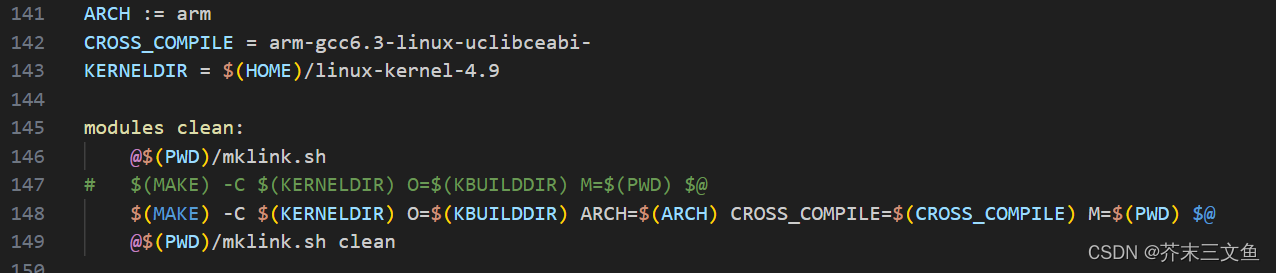
<p>交叉编译需要修改<code class="language-plaintext highlighter-rouge">KERNELDIR</code> 变量，取消 <code class="language-plaintext highlighter-rouge">ARCH</code> 和 <code class="language-plaintext highlighter-rouge">CROSS_COMPILE</code> 的注释并修改为实际值。另外还需要交换注释 make 那一行：</p>

<p><img src="/assets/images/bl616-driver-modification-2.png" alt="Makefile 修改 2" /></p>

<p>编译出现报错，请仔细对照错误信息和文档检查是否启用了内核相关配置选项，例如 <code class="language-plaintext highlighter-rouge">bl_get_wireless_stats()</code> 函数报错是因为没有启用 <code class="language-plaintext highlighter-rouge">CONFIG_WIRELESS_EXT</code> 选项。</p>

<p>具体步骤请参考安信可官网文档《BL616 Linux 驱动移植及使用说明》以及驱动源码下的 README 文档。</p>

<h1 id="五安装驱动到目标板">五、安装驱动到目标板</h1>

<p>驱动支持 STA / AP、STA + AP 和 Repeater 三种模式，我们以 STA + AP 共存模式为例子讲解过程，其他两种模式的配置参数可参考源码下的 README 文档。</p>

<ol>
  <li>将内核模块（<code class="language-plaintext highlighter-rouge">bl_sdio_drv.ko</code> 或 <code class="language-plaintext highlighter-rouge">bl_usb_drv.ko</code>）和对应模组固件拷贝到目标板文件系统中，将对应模组固件（<code class="language-plaintext highlighter-rouge">bl616_sd_combo.bin</code> 或 <code class="language-plaintext highlighter-rouge">bl616_usb_combo.bin</code>）放在 <code class="language-plaintext highlighter-rouge">/lib/firmware</code> 文件夹下。</li>
  <li>执行<code class="language-plaintext highlighter-rouge">insmod bl616_sd_combo.bin opmode=2</code> 或者 <code class="language-plaintext highlighter-rouge">insmod bl616_usb_combo.bin opmode=2</code> 加载内核模组。</li>
  <li>使用 <code class="language-plaintext highlighter-rouge">ip addr</code> 命令查看是否新增了 2 块无线网卡，<code class="language-plaintext highlighter-rouge">wlan0</code> 和 <code class="language-plaintext highlighter-rouge">ap0</code>，若没有检测到无线网卡，检查接线或者使用 <code class="language-plaintext highlighter-rouge">dmesg</code> 命令查看内核日志诊断原因</li>
  <li>若启用了 <code class="language-plaintext highlighter-rouge">rfkill</code> ，需要使用 <code class="language-plaintext highlighter-rouge">rfkill unblock all</code> 启用无线网卡。</li>
</ol>

<h1 id="六使用-wpa_supplicant-连接-wi-fi-热点">六、使用 wpa_supplicant 连接 Wi-Fi 热点</h1>

<ol>
  <li>使用 <code class="language-plaintext highlighter-rouge">ps -eF | grep wpa_supplicant</code> 命令检查当前是否运行了其他的 <code class="language-plaintext highlighter-rouge">wpa_supplicant</code>，若存在需要先 kill 掉，否则会失败。</li>
  <li>使用下面指令设置 Wi-Fi 网络</li>
</ol>

<div class="language-shell highlighter-rouge"><div class="highlight"><pre class="highlight"><code>wpa_passphrase ABC 12345678 <span class="o">&gt;</span> bf.conf  <span class="c"># 把 ABC 和 12345678 替换为你实际WiFi的ssid和password，</span>
wpa_supplicant <span class="nt">-D</span> nl80211 <span class="nt">-i</span> wlan0 <span class="nt">-c</span> bf.conf <span class="nt">-B</span> <span class="c"># 启动 wpa_supplicant 连接网络，wlan0换成实际无线网卡接口</span>
udhcpc <span class="nt">-i</span> wlan0  <span class="c"># 通过 DHCP 获取 IP 地址</span>
</code></pre></div></div>
<ol>
  <li>
    <p>连接完成后，使用 <code class="language-plaintext highlighter-rouge">ip addr</code> 检查是否获取到 IP 地址</p>
  </li>
  <li>
    <p>连接 WPA3 加密的 WiFi 热点</p>
  </li>
</ol>

<div class="language-shell highlighter-rouge"><div class="highlight"><pre class="highlight"><code><span class="nb">cat</span> <span class="o">&lt;&lt;</span><span class="sh">'</span><span class="no">EOF</span><span class="sh">' &gt; bf.conf
ctrl_interface=/var/run/wpa_supplicant
update_config=1

network={
    ssid="ASUS_2.4"
    scan_ssid=1
    key_mgmt=SAE
    psk="88888888"
    ieee80211w=1
}
</span><span class="no">EOF
</span></code></pre></div></div>

<h1 id="七使用-hostapd-开启-wi-fi-热点">七、使用 hostapd 开启 Wi-Fi 热点</h1>

<ol>
  <li>查看是否存在名称为 <code class="language-plaintext highlighter-rouge">ap0</code> 的网卡
    <div class="language-shell highlighter-rouge"><div class="highlight"><pre class="highlight"><code>ip addr
</code></pre></div>    </div>
  </li>
  <li>新建 hostapd 配置文件</li>
</ol>

<div class="language-shell highlighter-rouge"><div class="highlight"><pre class="highlight"><code><span class="nb">cat</span> <span class="o">&lt;&lt;</span><span class="sh">'</span><span class="no">EOF</span><span class="sh">' &gt; hostapd.conf
interface=ap0
drvier=nl80211

# Operation mode a = IEEE 802.11a (5 GHz), b = IEEE 802.11b (2.4 GHz),
# g = IEEE 802.11g (2.4 GHz), ad = IEEE 802.11ad (60 GHz); 
# a/g options are used with IEEE 802.11n (HT), too, to specify band. 
# For IEEE 802.11ac (VHT), this needs to be set to hw_mode=a. 
# For IEEE 802.11ax (HE) on 6 GHz this needs to be set to hw_mode=a.
hw_mode=g

# 2.4GHz的频段下信道可选1-13
channel=7

wmm_enabled=0
macaddr_acl=0
auth_algs=1
ignore_broadcast_ssid=0
wpa=2
wpa_key_mgmt=WPA-PSK
wpa_pairwise=TKIP
rsn_pairwise=CCMP

#你的wifi名字
ssid=BL616

#你的密码
wpa_passphrase=12345678
</span><span class="no">EOF
</span></code></pre></div></div>

<ol>
  <li>运行 hostapd 服务</li>
</ol>

<div class="language-shell highlighter-rouge"><div class="highlight"><pre class="highlight"><code>hostapd <span class="nt">-B</span> hostapd.conf
</code></pre></div></div>

<ol>
  <li>配置 AP 的 IP 地址</li>
</ol>

<div class="language-shell highlighter-rouge"><div class="highlight"><pre class="highlight"><code>ip address add 192.168.9.1/24 dev ap0
</code></pre></div></div>

<ol>
  <li>配置 AP 的 DHCP 服务</li>
</ol>

<div class="language-shell highlighter-rouge"><div class="highlight"><pre class="highlight"><code><span class="nb">cat</span> <span class="o">&lt;&lt;</span><span class="sh">'</span><span class="no">EOF</span><span class="sh">' &gt; udhcpd.conf
interface ap0
start 192.168.9.100
end 192.168.9.200
max_leases 200
</span><span class="no">EOF
</span></code></pre></div></div>
<ol>
  <li>启动 DHCP 服务器</li>
</ol>

<div class="language-shell highlighter-rouge"><div class="highlight"><pre class="highlight"><code>udhcpd udhcpd.conf &amp; 
</code></pre></div></div>

<ol>
  <li>连接热点进行测试，SSID <code class="language-plaintext highlighter-rouge">BL616</code>，密码 <code class="language-plaintext highlighter-rouge">12345678</code></li>
</ol>

<h1 id="八ble">八、BLE</h1>

<ol>
  <li>初始化蓝牙（仅 UART 方式，USB可以跳过）</li>
</ol>

<div class="language-shell highlighter-rouge"><div class="highlight"><pre class="highlight"><code><span class="c"># /dev/ttyUSB0：模组接到树莓派的串口号，根据实际串口号替换</span>
hciattach <span class="nt">-s</span> 115200 /dev/ttyUSB0 any 115200 noflow nosleep
</code></pre></div></div>

<ol>
  <li>查询 HCI</li>
</ol>

<div class="language-shell highlighter-rouge"><div class="highlight"><pre class="highlight"><code>hciconfig
</code></pre></div></div>

<p>若出现 <code class="language-plaintext highlighter-rouge">hci0</code> 等设备代表 OK。</p>

<ol>
  <li>开启和重启一下模组蓝牙</li>
</ol>

<div class="language-shell highlighter-rouge"><div class="highlight"><pre class="highlight"><code>hciconfig hci0 up
hciconfig hci0 reset
</code></pre></div></div>

<ol>
  <li>（可选）配置 BLE 广播数据，可以在调试助手上点击扫到的 BLE 设备查看</li>
</ol>

<div class="language-shell highlighter-rouge"><div class="highlight"><pre class="highlight"><code>hcitool <span class="nt">-i</span> hci0 cmd 0x08 0x0008 1f 02 01 06 0b 09 42 54 42 4c 45 2d 44 45 56 00 00 00 00 00 00 00 00 00 00 00 00 00 00 00 00 00
</code></pre></div></div>

<ol>
  <li>（可选）配置 BLE 扫描响应数据，可以在调试助手上点击扫到的 BLE 设备查看</li>
</ol>

<div class="language-shell highlighter-rouge"><div class="highlight"><pre class="highlight"><code>hcitool <span class="nt">-i</span> hci1 cmd 0x08 0x0009 1f 02 01 06 0a 09 42 54 42 4c 45 2d 44 45 56 00 00 00 00 00 00 00 00 00 00 00 00 00 00 00 00 00
</code></pre></div></div>

<ol>
  <li>开启 BLE 广播</li>
</ol>

<div class="language-shell highlighter-rouge"><div class="highlight"><pre class="highlight"><code>hciconfig hci1 leadv 0
</code></pre></div></div>

<ol>
  <li>打开监控软件</li>
</ol>

<div class="language-shell highlighter-rouge"><div class="highlight"><pre class="highlight"><code>btmon
</code></pre></div></div>

<ol>
  <li>停止广播和再次广播</li>
</ol>

<div class="language-shell highlighter-rouge"><div class="highlight"><pre class="highlight"><code>hciconfig hci1 noleadv
hciconfig hci1 leadv 0
</code></pre></div></div>

<h1 id="九更多资料">九、更多资料</h1>

<ul>
  <li><a href="https://docs.ai-thinker.com/ai_m62">Ai-M62系列模组专题</a></li>
  <li><a href="https://oshwhub.com/ai-thiner_openteam">嘉立创安信可科技开源团队</a></li>
</ul>]]></content><author><name></name></author><category term="iot" /><category term="bouffalolab" /><category term="bl616" /><summary type="html"><![CDATA[一、概述]]></summary></entry></feed>